Range constraint
Literal bounds
Example
The validation type is integer and the criteria is between, with minimum 1 and maximum 10. The value of A1 therefore must be an integer in the closed range 1..10.
php
$config = [
    'path' => './'
];

$validation = new \Vtiful\Kernel\Validation();
$validation->validationType(\Vtiful\Kernel\Validation::TYPE_INTEGER)
    ->criteriaType(\Vtiful\Kernel\Validation::CRITERIA_BETWEEN)
    ->minimumNumber(1)
    ->maximumNumber(10);

$excel    = new \Vtiful\Kernel\Excel($config);
$filePath = $excel->fileName('tutorial.xlsx')
    ->header(['Value'])
    ->validation('A1', $validation->toResource())
    ->insertText(0, 0, 20) // Out-of-range; the write succeeds, Excel flags the cell on open.
    ->output();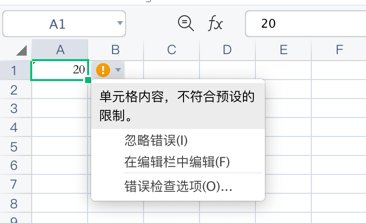
Bounds taken from cells
Example
The validation type is integer and the criteria is between, with the lower bound read from cell A1 and the upper bound from B1. The value of C1 must therefore be an integer between the values of A1 and B1.
php
$config = [
    'path' => './'
];

$validation = new \Vtiful\Kernel\Validation();
$validation->validationType(\Vtiful\Kernel\Validation::TYPE_INTEGER)
    ->criteriaType(\Vtiful\Kernel\Validation::CRITERIA_BETWEEN)
    ->minimumFormula('=A1')
    ->maximumFormula('=B1');

$excel    = new \Vtiful\Kernel\Excel($config);
$filePath = $excel->fileName('tutorial.xlsx')
    ->header([1, 10])
    ->validation('C1', $validation->toResource())
    ->insertText(0, 2, 20)
    ->output();